
Note
Go to the end to download the full example code.
Deal with IRIS v34 rasters#
In this example we will show how irispy deals with a v34 dataset by default and how
to undo that if you so desire.
These v34 are scans which raster from west to east instead of the default east to west.
import matplotlib.pyplot as plt
import pooch

import astropy.units as u
from astropy.coordinates import SkyCoord, SpectralCoord
from astropy.wcs.utils import wcs_to_celestial_frame

from sunpy.coordinates.frames import Helioprojective

from irispy.io import read_files
We start with getting data from the IRIS data archive.
This is a very large sparse 64-step raster with a FOV of 63”x175” for a total of 8 complete raster scans.
In this case, we will use pooch to keep this example self-contained
but you can download the data manually using your browser as well.
You will need to update the path to the data in the next section if you do that.
raster_filename = pooch.retrieve(
    "https://www.lmsal.com/solarsoft/irisa/data/level2_compressed/2025/03/28/20250328_225628_3400109360/iris_l2_20250328_225628_3400109360_raster.tar.gz",
    known_hash="ce46e93a8962b04da344c203c4f75a8d7411d1f587e25d728a6ca8398208de1a",
)
We will now open the data using a helper function which is designed to read all files from a single observation.
By default, irispy will read the v34 data, flipping the data so that it is in the same orientation as normal IRIS data and adjust the WCS accordingly.
raster = read_files(raster_filename)
# We will also undo the v34 handling and read the data as is.
raster_unflipped = read_files(raster_filename, revert_v34=True)

# Printing will give us an overview of the file.
print(raster)
Raster Collection
-----------------
Spectral Windows (cube keys): (np.str_('C II 1336'), np.str_('O I 1356'), np.str_('Si IV 1394'), np.str_('Si IV 1403'), np.str_('2832'), np.str_('2814'), np.str_('Mg II k 2796'))
Number of Cubes: 7
Aligned dimensions: [8 64 548]
Aligned physical types: [('meta.obs.sequence',), ('custom:pos.helioprojective.lat', 'custom:pos.helioprojective.lon', 'time'), ('custom:pos.helioprojective.lat', 'custom:pos.helioprojective.lon')]
We will now pull the ‘Mg II k 2796’ spectral line data from the raster.
mg_ii_k = raster["Mg II k 2796"]
mg_ii_k_unflipped = raster_unflipped["Mg II k 2796"]
print(mg_ii_k)
/home/docs/checkouts/readthedocs.org/user_builds/irispy/conda/stable/lib/python3.13/site-packages/astropy/wcs/wcsapi/fitswcs.py:555: AstropyUserWarning: target cannot be converted to ICRS, so will not be set on SpectralCoord
  warnings.warn(
SpectrogramCubeSequence
-----------------------
Time Range: ['2025-03-28 23:06:11.567' '2025-03-29 00:05:33.605']
Pixel Dimensions: (8, 64, 548, 380)
Longitude range: [-971.22065454 -906.26625683] arcsec
Latitude range: [291.24545321 474.94905715] arcsec
Spectral range: [2.79060386e-07 2.80990254e-07] m
Data unit: DN_IRIS_NUV
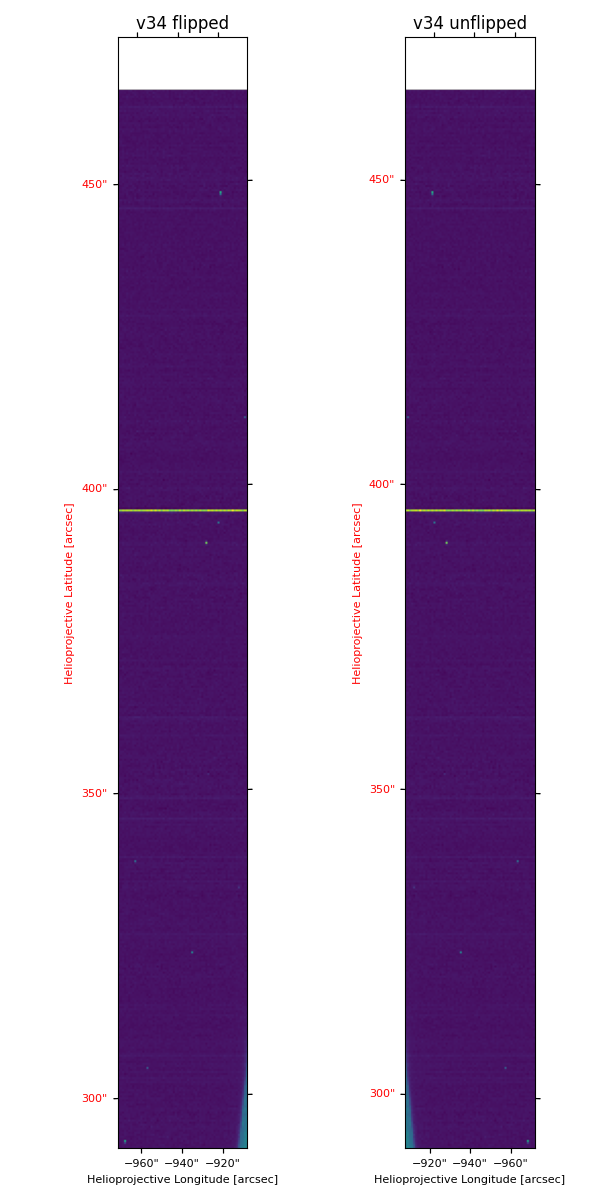
To see the effect of the v34 handling, we will plot a spectroheliogram for the Mg II k core wavelength.
We can use the crop method to get this information, this will
require a astropy.coordinates.SpectralCoord object from astropy.coordinates.
# None, means that the axis is not cropped
# Since we want one physical coordinate, we will just use the
# same spectral coordinate for both axes.
lower_corner = [SpectralCoord(280, unit=u.nm), None]

mg_spec_crop = mg_ii_k[0].crop(lower_corner, lower_corner)
mg_spec_unflipped_crop = mg_ii_k_unflipped[0].crop(lower_corner, lower_corner)

fig = plt.figure(figsize=(6, 12))
ax = fig.add_subplot(121, projection=mg_spec_crop.wcs)
ax.set_title("v34 flipped")
mg_spec_crop.plot(axes=ax, plot_axes=["x", "y"])

ax2 = fig.add_subplot(122, projection=mg_spec_unflipped_crop.wcs)
ax2.set_title("v34 unflipped")
mg_spec_unflipped_crop.plot(axes=ax2, plot_axes=["x", "y"])
fig.tight_layout()
/home/docs/checkouts/readthedocs.org/user_builds/irispy/conda/stable/lib/python3.13/site-packages/astropy/wcs/wcsapi/fitswcs.py:723: AstropyUserWarning: No observer defined on WCS, SpectralCoord will be converted without any velocity frame change
  warnings.warn(
/home/docs/checkouts/readthedocs.org/user_builds/irispy/conda/stable/lib/python3.13/site-packages/astropy/wcs/wcsapi/fitswcs.py:555: AstropyUserWarning: target cannot be converted to ICRS, so will not be set on SpectralCoord
  warnings.warn(
As you can see, the v34 data is flipped in the y-axis and the WCS is adjusted accordingly.
The same is true for the times in the raster:
print(f"Flipped time: {mg_ii_k.time[:5]}")
print("*" * 50)
print(f"Unflipped time: {mg_ii_k_unflipped.time[:5]}")
Flipped time: ['2025-03-28T23:06:11.567' '2025-03-28T23:06:02.292'
 '2025-03-28T23:05:53.067' '2025-03-28T23:05:43.787'
 '2025-03-28T23:05:34.567']
**************************************************
Unflipped time: ['2025-03-28T22:56:28.715' '2025-03-28T22:56:38.067'
 '2025-03-28T22:56:47.348' '2025-03-28T22:56:56.567'
 '2025-03-28T22:57:05.792']
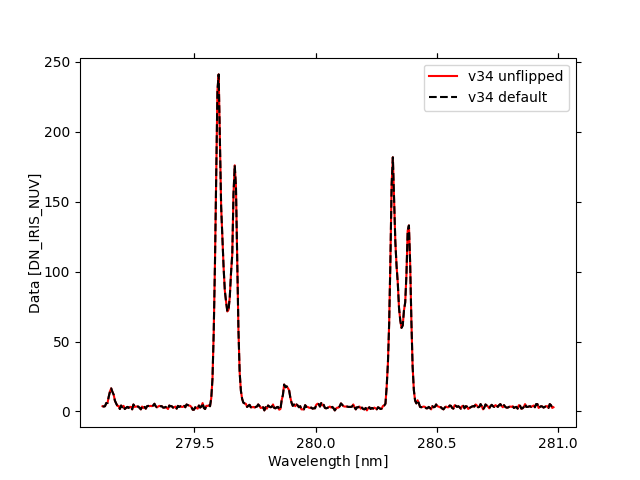
Finally we will just see that the spectral profiles are unaffected in either case.
We choose a specific helioprojective location and crop the spectrogram down to the spectrum at that point.
iris_observer = wcs_to_celestial_frame(mg_ii_k[0].wcs.celestial).observer
iris_frame = Helioprojective(observer=iris_observer)
lower_corner = [None, SkyCoord(-908 * u.arcsec, 311 * u.arcsec, frame=iris_frame)]

mg_ii_k_unflipped_spectra = mg_ii_k_unflipped[0].crop(lower_corner, lower_corner)
mg_ii_k_spectra = mg_ii_k[0].crop(lower_corner, lower_corner)

fig = plt.figure()
ax = fig.add_subplot(111, projection=mg_ii_k_unflipped_spectra.wcs)
mg_ii_k_unflipped_spectra.plot(axes=ax, color="red", label="v34 unflipped")
mg_ii_k_spectra.plot(axes=ax, color="black", label="v34 default", linestyle="--")
plt.legend()

plt.show()
/home/docs/checkouts/readthedocs.org/user_builds/irispy/conda/stable/lib/python3.13/site-packages/astropy/wcs/wcsapi/fitswcs.py:555: AstropyUserWarning: target cannot be converted to ICRS, so will not be set on SpectralCoord
  warnings.warn(
Total running time of the script: (0 minutes 35.676 seconds)