
Note
Go to the end to download the full example code.
Remove Dust from IRIS Slit-Jaw Imager#
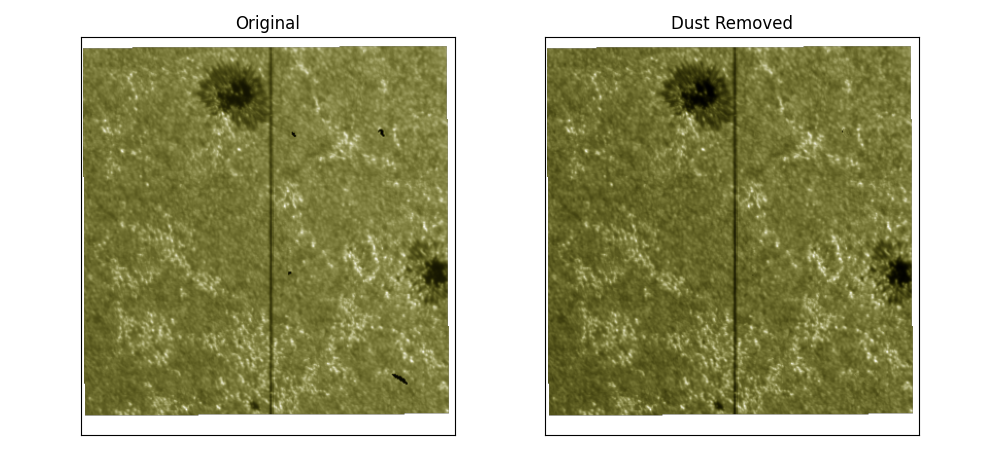
This example shows how to remove dust from IRIS slit-jaw imager (SJI).
import matplotlib.pyplot as plt
import pooch

from irispy.io import read_files
We start with getting data from the IRIS data archive.
In this case, we will use pooch to keep this example self-contained
but you can download the data manually using your browser as well.
You will need to update the path to the data in the next section if you do that.
sji_filename = pooch.retrieve(
    "http://www.lmsal.com/solarsoft/irisa/data/level2_compressed/2014/09/19/20140919_051712_3860608353/iris_l2_20140919_051712_3860608353_SJI_2832_t000.fits.gz",
    known_hash="7ec0f3d63d97bc7620675c78fb6c670ef5b4249d31ef7818435b629c04b72f60",
)
Now we just read it and apply the irispy.utils.dust.remove_dust method to
the cube.
sji_2832 = read_files(sji_filename)
# We crop the cube to reduce memory usage for the online documentation build.
sji_subset = sji_2832[44:46]
clean_subset = sji_subset.remove_dust()
Finally, we can compare one frame before and after the dust treatment.
frame_index = 1
original_frame = sji_subset[frame_index]
cleaned_frame = clean_subset[frame_index]

fig = plt.figure(figsize=(10, 4.5))
fig.subplots_adjust(wspace=0.03)

ax0 = fig.add_subplot(121, projection=original_frame.wcs)
original_frame.plot(axes=ax0)
ax0.set_title("Original")

ax1 = fig.add_subplot(122, projection=cleaned_frame.wcs)
cleaned_frame.plot(axes=ax1)
ax1.set_title("Dust Removed")

for ax in (ax0, ax1):
    ax.coords[0].set_ticks_visible(False)
    ax.coords[0].set_ticklabel_visible(False)
    ax.coords[1].set_ticks_visible(False)
    ax.coords[1].set_ticklabel_visible(False)

fig.tight_layout()
plt.show()
Total running time of the script: (0 minutes 6.599 seconds)