
Note
Go to the end to download the full example code.
Remove Cosmic Ray Hits from IRIS data#
This example illustrates how to remove cosmic ray hits from IRIS SJI data.
We will use the astroscrappy backend and has to be installed separately using pip or conda.
irispy supports two backends for cosmic ray removal, they are compared on spectra here: Compare Cosmic Ray Removal Backends.
import matplotlib.pyplot as plt
import pooch

from astropy.visualization import quantity_support

from irispy.io import read_files

quantity_support()
<astropy.visualization.units.quantity_support.<locals>.MplQuantityConverter object at 0x71f3f20e6900>
We start with getting data from the IRIS data archive.
In this case, we will use pooch to keep this example self-contained
but you can download the data manually using your browser as well.
You will need to update the path to the data in the next section if you do that.
sji_filename = pooch.retrieve(
    "https://www.lmsal.com/solarsoft/irisa/data/level2_compressed/2026/02/06/20260206_210853_3460104433/iris_l2_20260206_210853_3460104433_SJI_2832_t000.fits.gz",
    known_hash="d5088c6a0753ea9ce7b525865ba2edf13a637097ee995985b511833897c88ca6",
)
We will now open the file we just downloaded and select one frame.
astroscrappy works on one 2D frame at a time. Selecting a single frame
keeps this example lightweight enough for documentation builds while still
demonstrating the same API.
sji_2832 = read_files(sji_filename)
sji_frame = sji_2832[5]
del sji_2832
Now we use remove_cosmic_rays with the astroscrappy backend.
This algorithm can perform well with both high and low noise levels in the original data.
This particular image has lots of high intensity cosmic ray hits which
cannot be effectively removed by using the default set of parameters.
So we reduce sigma (mapped to astroscrappy’s sigclip) from 4.5 to 2 to mark more hits.
We also reduce objlim, the contrast between the Laplacian image and the fine structured image
to clean the high intensity bright cosmic ray hits.
We also modify the readnoise parameter to obtain better results.
For more details on the parameters, see the astroscrappy documentation.
sji_cleaned = sji_frame.remove_cosmic_rays(
    method="astroscrappy",
    sigma=2,
    method_kwargs={"objlim": 2, "readnoise": 4},
)
remove_cosmic_rays returns a cleaned cube with the same metadata and coordinates.
We now plot the noisy frame and the cleaned frame side-by-side.
fig = plt.figure(figsize=(12, 5), constrained_layout=True)

ax = fig.add_subplot(121, projection=sji_frame.wcs)
sji_frame.plot(axes=ax, vmin=0, vmax=500)
ax.set_title("Original")

ax1 = fig.add_subplot(122, projection=sji_cleaned.wcs)
sji_cleaned.plot(axes=ax1, vmin=0, vmax=500)
ax1.set_title("Cleaned")

ax1.coords[1].set_ticks_visible(False)
ax1.coords[1].set_ticklabel_visible(False)
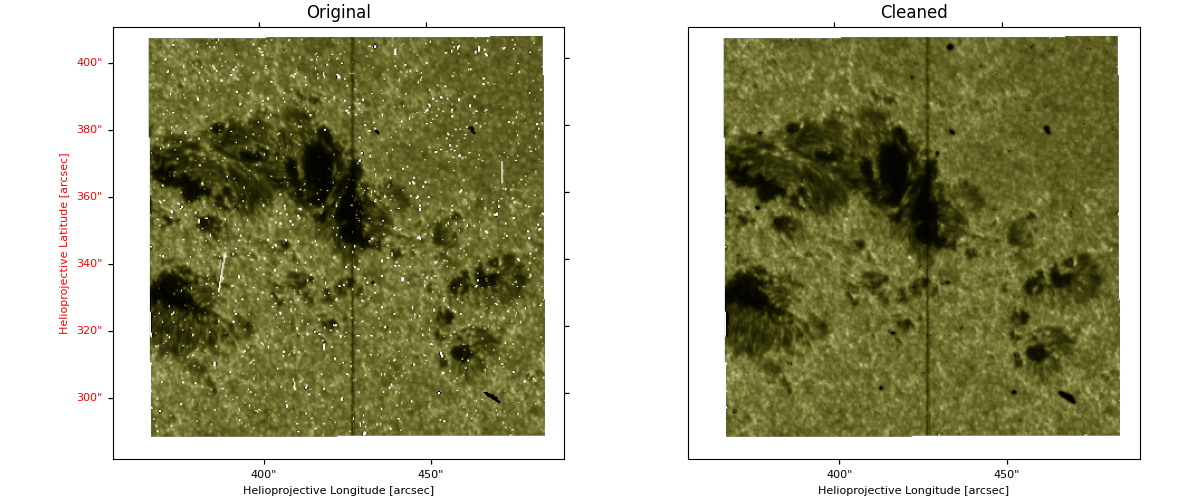
For any cosmic ray removal, it is important to check the results. These methods are not perfect and can sometimes mark real features as cosmic ray hits, especially if the parameters are not tuned for the specific data.
plt.show()
Total running time of the script: (0 minutes 2.015 seconds)