
Note
Go to the end to download the full example code.
Remove Cosmic Rays from IRIS SJI data#
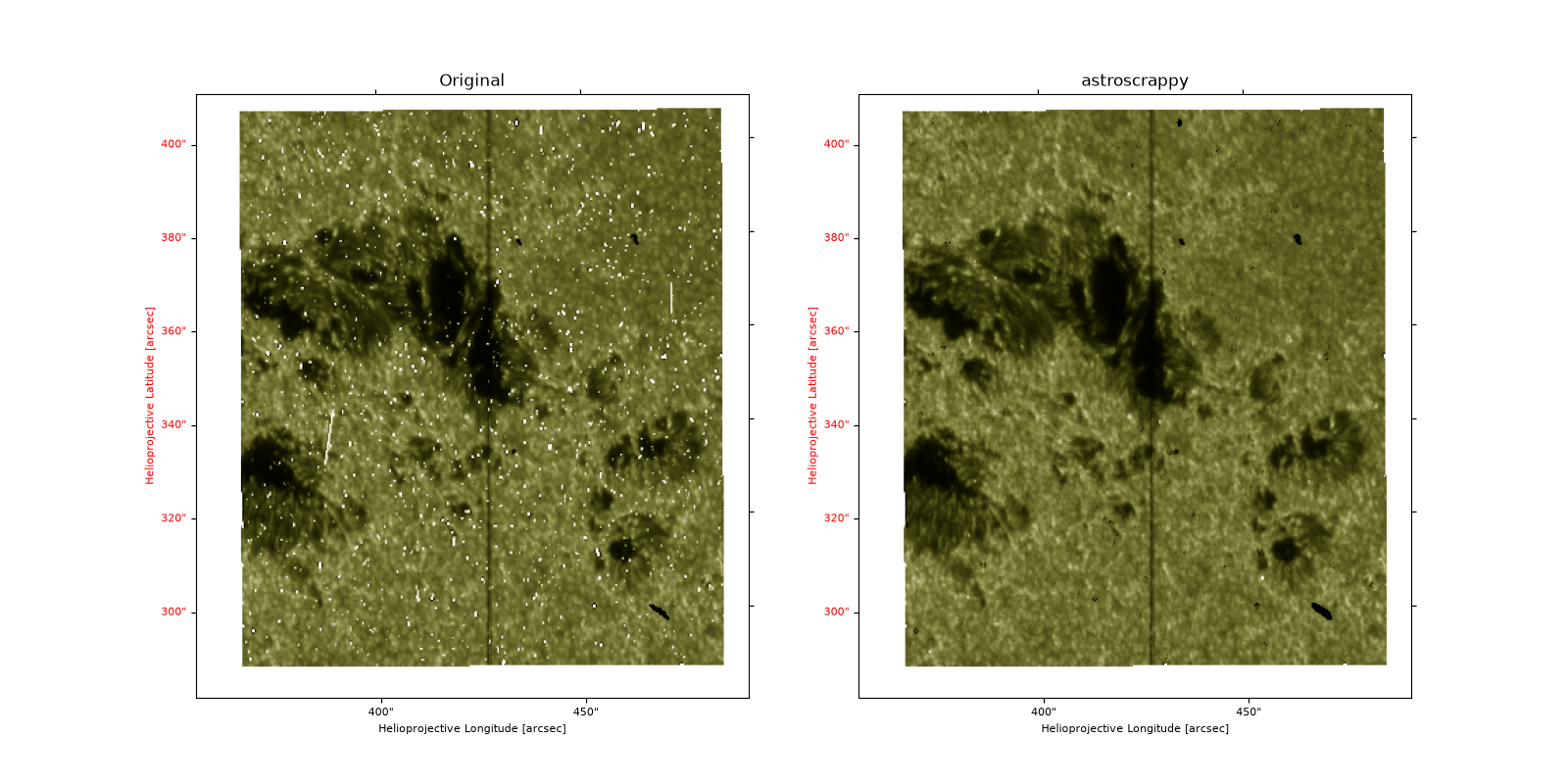
This example illustrates how to remove cosmic ray hits from IRIS SJI data.
We will use the astroscrappy backend, which has to be installed separately using pip or conda.
We select astroscrappy for the SJI data because it is considered the better solution for imaging data.
To understand astroscrappy, how it works and what are allowed parameters, we suggest you read the original
documentation:
import matplotlib.pyplot as plt
import numpy as np
import pooch

from astropy.visualization import quantity_support

from irispy.io import read_files

quantity_support()
<astropy.visualization.units.quantity_support.<locals>.MplQuantityConverterFormatted object at 0x7a90b3dd0c20>
We start with getting data from the IRIS data archive.
This dataset is during the South Atlantic Anomaly (SAA) passage, which is known to cause a large number of cosmic ray hits in the data.
This is what we call, a worst-case scenario for cosmic ray removal, which is good for testing the algorithms but not ideal for science.
In this case, we will use pooch to keep this example self-contained
but you can download the data manually using your browser as well.
You will need to update the path to the data in the next section if you do that.
sji_filename = pooch.retrieve(
    "https://www.lmsal.com/solarsoft/irisa/data/level2_compressed/2026/02/06/20260206_210853_3460104433/iris_l2_20260206_210853_3460104433_SJI_2832_t000.fits.gz",
    known_hash="d5088c6a0753ea9ce7b525865ba2edf13a637097ee995985b511833897c88ca6",
)
We will now open the data using a helper function which is designed to read all files from a single observation.
sji_2832 = read_files(sji_filename)
sji_frame = sji_2832[5]
del sji_2832
Now we use remove_cosmic_rays with the default
parameters on IRIS Level 2 SJI data.
astroscrappy is a more general-purpose cosmic ray removal algorithm that
is widely used in the astronomy community for imaging data. Note that this is
not the default backend used for remove_cosmic_rays.
astroscrappy has a set of default parameters that are not necessarily
optimal for IRIS data.
In addition, there is a lot of optional parameters that can be tweaked, which might
improve the results for your data and science case or make it worse.
Unfortunately, there is no one-size-fits-all solution for cosmic ray removal,
and you will need to read the documentation and experiment with the parameters
to find the best solution for your data.
What we can say that is for astroscrappy, is the defaults work pretty well
for SJI data out of the box.
A few other notes about astroscrappy, found running on spectra data:
astroscrappy does not remove small negative dips “flanking” positive spikes, which happens
commonly.
astroscrappy can not deal with cosmic ray hits that cause purely negative intensity spikes
in a safe, straightforward way.
# For example, these set of parameters was shown to show better treatment of values around
# any spikes, basically to smooth more around each spike. (Thanks to Juraj).
method_kwargs = {"sigclip": 3, "objlim": 5, "readnoise": 3.1, "satlevel": np.inf, "cleantype": "medmask"}
sji_astroscrappy = sji_frame.remove_cosmic_rays(method="astroscrappy", method_kwargs=method_kwargs)
One reason to always be cautious when removing cosmic rays is that you can easily remove real features in the data if you are too aggressive.
fig, axes = plt.subplots(1, 2, figsize=(16, 8), subplot_kw={"projection": sji_frame.wcs}, sharex=True, sharey=True)

sji_frame.plot(axes=axes[0], aspect="auto", vmin=0, vmax=500, origin="lower")
axes[0].set_title("Original")
sji_astroscrappy.plot(axes=axes[1], aspect="auto", vmin=0, vmax=500, origin="lower")
axes[1].set_title("astroscrappy")

plt.show()
Total running time of the script: (0 minutes 2.174 seconds)